


Talking Ben the Dog
4.166.93K Reviews
App Specs
- Version
- 4.9.6.695
- Updated On
- License
- Free
- Downloads
- 100,000,000+
- Developer
- Outfit7 Limited
- Categories
- Entertainment
- Platform
- Android, iOS
Screenshots



 Analysis by AppCompare
I’d treat Talking Ben the Dog as a compact, hands-on comedy toy rather than a game with a long campaign or a pet simulator that asks for daily care. Its appeal is immediate: Ben reacts when you interact with him, and the humor comes from seeing what a simple action produces. That makes it easy to pick up during a short break, or to share with a child who enjoys silly voices and expressive characters. The experience is deliberately limited, though; if you want a deep game or a conversation partner that understands what you mean, you’ll be looking for something else.
What you can expect to pay
The app is free to download, so you can try its central interactions without paying an upfront price. It also offers in-app purchases, with listed items ranging from $0.99 to $9.99. I’d keep that distinction in mind when deciding whether it suits your household: free access gives you a way to see whether Ben’s humor lands, while any paid purchase is optional rather than an entry fee. I wouldn’t spend money until you’ve watched the intended user try the app and know that its style holds their attention.
Talking Ben is an entertainment app from Outfit7 Limited. It has a 4.0 average from around 1.9 million ratings and over 100 million installs, which suggests that its simple character-based format has reached a very broad audience. Those figures don’t tell you whether your child will enjoy the jokes, of course; a quick hands-on trial is more useful than popularity alone. The app is rated Everyone 10+, and I’d check that age guidance against the preferences and maturity of the person who will use it.
A small toy with a clear rhythm
When it comes to apps that mix fun and interactivity, Talking Ben the Dog is one that often comes up in conversations. If you’ve ever wished your pet could talk back to you, this app might just be the next best thing. Let me walk you through my experience with it, and maybe you’ll see why Ben is such a standout in the world of interactive apps.
Meet Ben: Your Chatty Canine Companion
So, what’s the deal with Talking Ben the Dog? Essentially, this app brings a virtual dog named Ben into your life, and he’s not just any dog—he’s a retired chemistry professor! The concept is simple yet intriguing. The app is designed to provide a mix of humor, interaction, and a dash of education with Ben’s quirky personality leading the way.
Getting Started with Ben
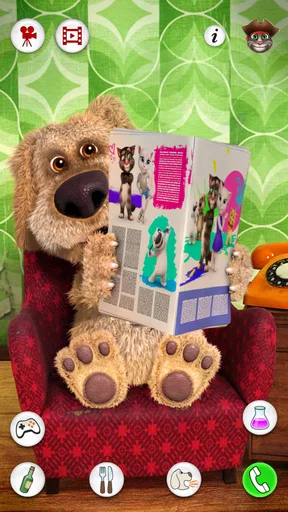
Jumping into the app, you’re greeted by Ben, who resides in his cozy little home. The graphics are vibrant and inviting, making it easy to get lost in his world. The initial setup is straightforward—just download, install, and you’re ready to go. Once you’re in, Ben is pretty much at your beck and call, ready to chat or just hang out.
Ben’s interactions are a huge part of the app’s charm. You can talk to Ben, and he amusingly repeats everything you say in his own voice. It’s a simple feature, but it’s endlessly entertaining, especially for younger users. But don’t worry, adults can get a kick out of it too! I found myself chuckling more than once at his responses.
Worth Reading Before You Choose

Baby Panda World Brings Quick Play to Modern Phones, but Its Game Library Feels Busy

ESPN’s Live Game View Makes Following Close Games Easier

QuizzLand Review: A Good Fit for Short Trivia Breaks, Not Every Player

Basketball Stars: Multiplayer Is Fast, but Can It Recover When Matches Go Wrong?

WEBTOON Turns Phone Updates Into a Better Reading Routine

Link to Windows Runs on Shared Habits, Not Social Feeds
Interactive Features Galore
What sets this app apart is the variety of interactions you can have with Ben. It’s not just about chatting. You can poke him, tickle him, and even have him answer the phone. Each interaction brings out a different side of Ben’s personality, keeping things fresh and entertaining.
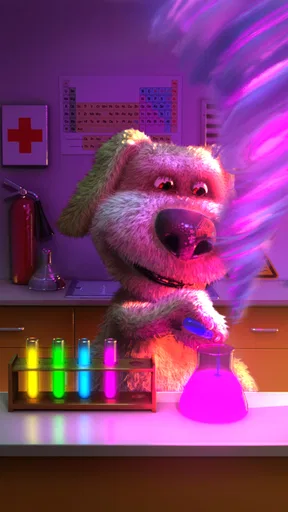
One of the highlights is Ben’s chemistry lab. Here, you can assist Ben with his experiments. Mixing different test tubes leads to some explosive results—literally! This part of the app adds a fun educational twist, as you get to explore basic chemical reactions in a light-hearted way.
Making the short sessions work
That quick, repeatable loop is where I think the app is most useful. If a child has a few minutes before dinner, or needs a low-stakes distraction while waiting for an appointment, Ben can provide a bit of amusement without requiring the player to learn a complicated set of rules. I’d use it as a brief shared activity: let the child choose an interaction, then ask what they think Ben will do before tapping. That turns a simple gag into a small moment of anticipation and conversation, rather than handing over a phone and hoping the app entertains them indefinitely.
There’s also a practical way to keep the novelty from fading too quickly: vary the interaction instead of repeating the same one over and over. Try a spoken phrase, then a physical reaction, then a visit to the lab. The appeal comes from comparing Ben’s different responses, not from chasing a score or completing a long checklist. For a very young child, I’d stay nearby and take turns, both to make it more social and to help keep screen time bounded. The app is best as a little interlude, not as a substitute for a longer activity.
How the humor compares with other options
Compared with a virtual pet built around feeding, dressing, or looking after a character over time, Ben’s draw is the instant reaction. You don’t need to build a routine around him to get to the joke. Against a conventional mobile game, it has less structure and less of a sense of progress; there may be no satisfying level to finish because the pleasure is in trying a different interaction and seeing what happens. And compared with a video, Ben gives the user a choice in the moment: a tap or a spoken line can change the immediate response. That is a modest kind of agency, but it is exactly what makes this particular format work.
If someone wants a more involved pet-raising experience, I’d choose an app designed around ongoing care. If they want a story, puzzles, or competitive play, a structured game will offer more to do. Ben is a better fit for people who enjoy short, repeatable bits of character comedy and don’t mind that the interaction is intentionally simple. The chemistry-lab angle gives the app another flavor, but I’d treat it as playful spectacle rather than a lesson that replaces supervised science activities.
Small choices that improve the experience
A useful first test is to see whether the person using the app enjoys Ben repeating their own words. That feature is the clearest way to judge whether the central joke works for them. Keep the first attempt short and try a few different kinds of interaction; if the repeated voice gets a laugh, the other reactions and the lab may extend the fun. If it doesn’t, the app’s other elements may not be enough to change their mind, so there’s little reason to push it.
I’d also think about where and when to use the talking feature. In a quiet waiting room, a child may enjoy watching Ben react without speaking loudly; at home, taking turns saying harmless phrases can make the repetition more entertaining. The point is not to test the app with a long script, since its charm is the immediate echo and reaction. For a parent or caregiver, setting a clear stopping point before opening it helps avoid turning a quick diversion into an open-ended screen session.
Trade-offs worth knowing before you install
The simplicity that makes Ben accessible is also the main limitation. Once you have tried the available reactions and lab interactions, there may be little reason to keep exploring in the same session. The app’s humor depends on the user finding the character funny, and repeated jokes can wear thin, especially for older players looking for more complex mechanics. I’d think of it as something to revisit occasionally rather than an app that must stay engaging for a long stretch every day.
It is also worth separating the playful chemistry theme from formal education. The experiments can spark curiosity, but the presentation is designed for entertainment, so I wouldn’t rely on it to teach scientific concepts in depth. Likewise, Ben’s repeated speech is a comic response, not a genuine conversation: he doesn’t offer the kind of understanding or thoughtful answers a child might expect from a person. If a user is looking for open-ended dialogue, a more suitable activity is talking together, reading a story, or using an educational app built around that goal.
The current version is 4.9.0.594, and the minimum operating-system requirement is Android 6.0. Before installing, I’d check that the device meets that requirement and consider whether its owner is comfortable with the optional purchases. The app is free to start, but the presence of paid items matters if a child can make purchase decisions on the device; I’d review the device’s purchase controls beforehand rather than assume every interaction is included at no cost.
Who is likely to get the most from Ben?
I’d recommend giving it a try if you’re choosing a quick, light entertainment app for someone who likes cartoon characters, silly reactions, and cause-and-effect play. It can work especially well as a shared five-minute diversion: a child chooses what to say or tap, and an adult joins in by guessing Ben’s response. That kind of back-and-forth makes the app feel less like passive viewing and gives the grown-up a natural way to decide when it’s time to stop.
I’d skip it for someone who gets bored without progression, wants a virtual pet that develops through ongoing care, or expects meaningful conversations. It’s also not my first pick when the goal is focused learning; the lab is a playful extra, not a substitute for a science activity with explanations and guidance. If the intended user dislikes repeated sound effects or prefers calmer, less performative apps, the central joke may become irritating rather than funny.
Why Ben Stands Out
In a market flooded with interactive pet apps, why should you pick Talking Ben? Well, it’s the combination of humor, engagement, and a bit of learning that makes it a winner. The app doesn’t just rely on cute animations; it actively encourages users to engage with Ben in various ways.
The audio quality is impressive too. Ben’s voice is clear, and his reactions feel natural, adding a layer of realism to the interactions. Plus, the app is regularly updated, ensuring that any bugs are swiftly dealt with, and new features are added to keep things interesting.
The Verdict
Wrapping it up, Talking Ben the Dog is a delightful app that offers a unique blend of humor and interaction. Whether you’re looking to entertain yourself or keep the kids occupied, Ben is a fantastic companion. It’s the kind of app that doesn’t take itself too seriously, which is precisely why it’s so much fun.
So, if you’re in the mood for some light-hearted fun with a dash of chemistry, give Talking Ben a try. Who knows? You might just discover your new favorite app buddy.
Pros
- Engaging and interactive gameplay.
- High-quality animations and sound.
- User-friendly interface.
- Variety of mini-games included.
- Regular updates with new content.
Cons
- Contains in-app purchases.
- Ads can be intrusive at times.
- Limited educational value.
- Requires internet for some features.
- May not appeal to older users.
FAQs for Talking Ben the Dog
What is Talking Ben the Dog?
Talking Ben the Dog is a mobile app where users interact with Ben, a retired chemistry professor who loves reading newspapers and drinking coffee. You can engage with him through various activities such as talking, tickling, and conducting fun experiments in his lab. It's available on both Android and iOS platforms.
Is Talking Ben the Dog safe for kids?
Yes, Talking Ben is designed to be family-friendly and is suitable for children. It features humorous and non-violent interactions, making it a safe choice for younger audiences. However, parents should be aware of in-app purchases and ensure their device settings restrict unauthorized purchases.
Does Talking Ben the Dog require an internet connection?
Talking Ben the Dog can be played offline, but some features, such as in-app purchases and certain interactive elements, may require an internet connection. For the best experience, it's recommended to have internet access, especially if you want to access updates and new content.
Can I play Talking Ben the Dog on multiple devices?
Yes, you can play on multiple devices, but progress may not sync across them unless linked to an account that supports cloud saving. Check the app's settings for options to connect with social accounts or cloud services to ensure data is saved and transferable.
Are there any in-app purchases in Talking Ben the Dog?
Yes, Talking Ben the Dog includes in-app purchases for items like additional content or in-game currency. These are optional and designed to enhance gameplay. Parents should monitor and manage these settings to prevent accidental purchases by children.


